The Osmo Coding Kit review comes down to a useful combination: children arrange physical coding blocks, then see their commands shape games on an iPad.
With three distinct apps and beginner-to-advanced puzzles, it suits families looking for an interactive way to explore coding fundamentals, provided they already have a compatible iPad.
Osmo Coding Kit Review Summary
The quick verdict
2,000+ ratings
Read Amazon ReviewsOsmo Coding Kit
A hands-on introduction to coding for children who have a compatible iPad and enjoy learning through physical puzzles, music, and guided adventures.
- Three included apps: Coding Awbie, Coding Jam, and Coding Duo.
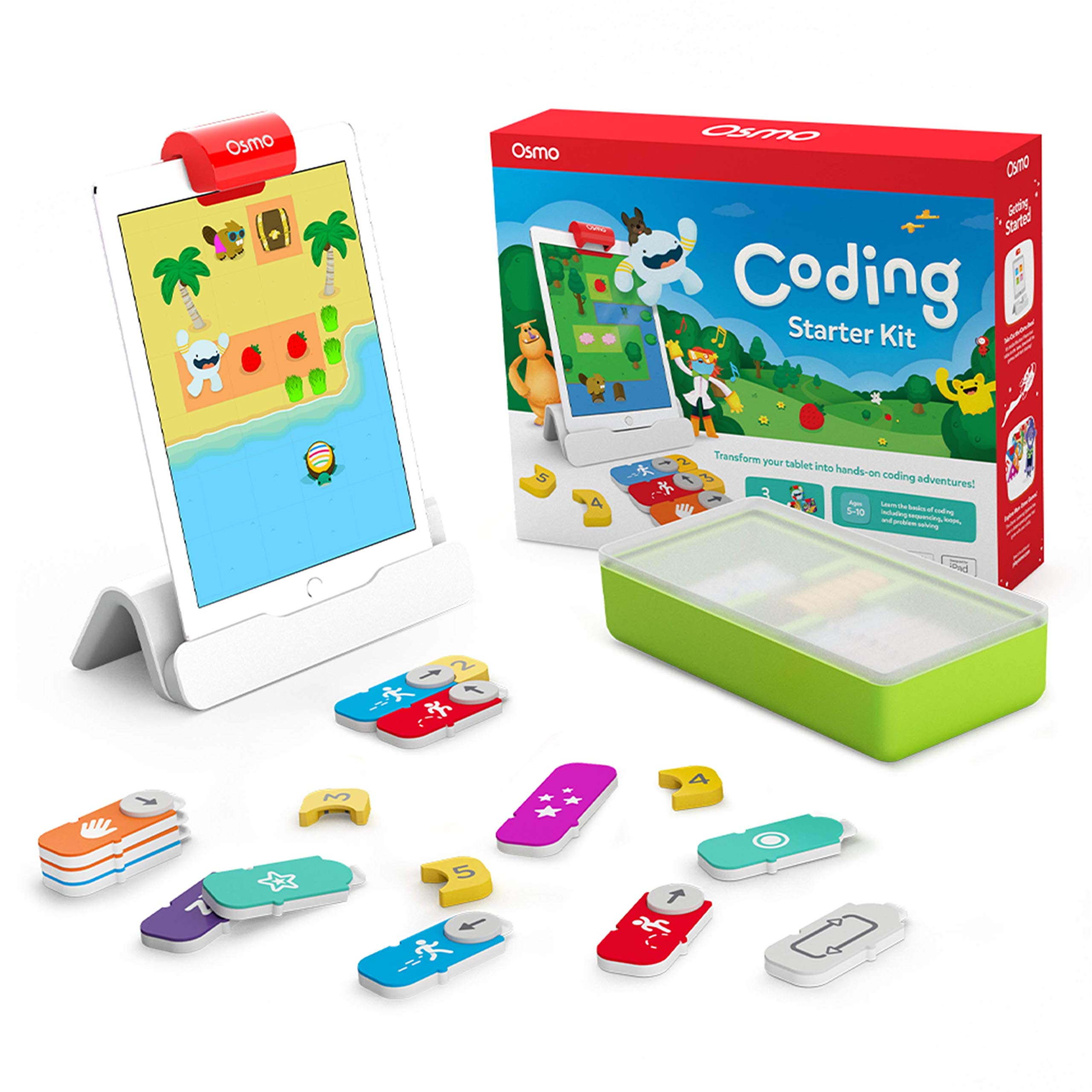
- 31 tangible coding blocks, including action commands, numbers, repeats, and subroutines.
- Osmo base and adjustable reflector for use with a compatible iPad; the iPad is not included.
- Coding Awbie uses physical blocks to guide a character through an adventure and introduce coding.

Pros
- Physical blocks make command sequences concrete and easy to rearrange during experimentation.
- Three different app styles give children options beyond a single puzzle format.
Consider before buying
- An iPad is required but not included, so the kit depends on owning a compatible device.
- Compatibility is model-specific; check the iPad model and iOS version before buying.
Read the full review summary
This kit makes coding commands tangible. Children use blocks for actions such as walking, jumping, repeating, and building subroutines, while the on-screen character Awbie responds to their arrangements.
Coding Awbie introduces command sequences through an adventure; Coding Jam turns patterns and loops into music; Coding Duo adds side-by-side puzzles designed for solo or collaborative play.
That variety gives the kit more than one way to engage with the same basic ideas.
The setup includes an Osmo base and adjustable reflector, 31 coding pieces, stackable storage, and access to all three educational apps.
An iPad is required and is sold separately; the supported device list is broad but specific, and the iPad must run iOS 15 or later.
This is a strong fit for children who enjoy hands-on problem solving and creative experimentation. Families without a compatible iPad, or those seeking a screen-free activity, should look elsewhere.
The buying factors
Osmo Coding Kit Scorecard
Editorial scores reflect listed features and buyer fit; they are not laboratory measurements or customer ratings.
Hands-on coding practice
Physical command blocks let children build and revise sequences through direct manipulation.
App variety
The three apps approach coding through an adventure, music creation, and puzzle solving.
Room to progress
The games are designed for beginner through expert levels, with more than 60 puzzles in Coding Duo.
Creative play
Coding Jam connects patterns and loops with music and more than 300 sounds.
Collaborative use
Coding Duo supports solo or shared puzzle play, though the kit's other apps emphasize different activities.
Setup flexibility
The included adjustable reflector is designed for old and newer iPads, but play still depends on a compatible iPad running iOS 15 or later.
Key Features and Specifications of Osmo Coding Kit
- Three included apps: Coding Awbie, Coding Jam, and Coding Duo.
- 31 tangible coding blocks, including action commands, numbers, repeats, and subroutines.
- Osmo base and adjustable reflector for use with a compatible iPad; the iPad is not included.
- Coding Awbie uses physical blocks to guide a character through an adventure and introduce coding.
- Coding Jam uses patterns and loops to create music, with more than 300 musical sounds.
- Coding Duo offers more than 60 side-by-side coding puzzles for solo or collaborative play.
- Designed for ages five and up, with games spanning beginner to expert levels; compatible iPads need iOS 15 or later.
Pros and Cons of Osmo Coding Kit
Pros
- Physical blocks make command sequences concrete and easy to rearrange during experimentation.
- Three different app styles give children options beyond a single puzzle format.
- The included reflector is adjustable and designed to work with older and newer supported iPads.
- Stackable storage gives the coding pieces a dedicated place between play sessions.
Consider before buying
- An iPad is required but not included, so the kit depends on owning a compatible device.
- Compatibility is model-specific; check the iPad model and iOS version before buying.
- The activity combines a tablet with physical pieces, so it may not suit families seeking screen-free play.
Who Should Buy Osmo Coding Kit?
Good fit
Consider the Osmo Coding Kit if a child likes puzzles and is ready to explore how instructions produce results.
The command blocks provide a physical way to arrange actions and revise a sequence, while Coding Awbie gives those commands an adventure context.
That structure can make early ideas such as ordering steps and using repeats more approachable than starting with a blank screen.
The three apps also give the kit useful variety. Coding Jam brings patterns and loops into music-making, while Coding Duo adds puzzles that can be tackled alone or with someone else.
This mix suits a child whose interests shift between stories, creative activities, and problem solving. The age guidance starts at five, and the games are designed to offer levels from beginner to expert.
Before choosing it, confirm that the iPad is on the supported list and runs iOS 15 or later.
The tablet is essential and not part of the kit, so the value of the set depends in part on having one available for play.
If that condition is met and physical interaction is a priority, the combination of 31 blocks and three coding-focused apps makes this a versatile learning toy.
Who should skip it
Skip it if you do not have access to a compatible iPad or want an activity that stays entirely off-screen.
Check the exact tablet model and software version before ordering, especially if your device uses a thin bezel and you are unsure whether the included reflector fits your setup.
It may also be a poor match for a child who wants only one narrow coding activity. The three apps vary their approach, but the kit is still centered on learning through Osmo's tablet-based games and physical blocks.
How the Osmo Coding Kit Turns Blocks into Coding Practice
Physical commands make sequences visible
The 31 pieces represent actions and coding concepts such as walking, jumping, numbers, repeats, and subroutines. Arranging them on a surface gives children a way to see and change a command sequence as they work.
The design favors experimentation: a child can rearrange blocks and observe how the on-screen character responds.
Three apps vary the learning activity
Coding Awbie uses an adventure to introduce coding, while Coding Jam connects loops and patterns with musical composition. Coding Duo shifts toward more advanced side-by-side puzzles and teamwork.
This range can help sustain interest across different play moods, although all three activities depend on the same tablet-based Osmo setup.
Progression and shared puzzles
The games are described as spanning beginner to expert levels, so the kit is intended to support continued learning rather than only a first encounter with coding.
Coding Duo includes more than 60 puzzles and can be played solo or with others, adding a collaborative option. Families can decide whether that format fits their child's interest in working through challenges independently or together.
Compatibility is the practical buying check
The base and adjustable reflector are included, but the iPad is not. The kit supports a specified range of iPad generations and requires iOS 15 or later.
Checking both the model and operating system before buying is the clearest way to avoid a mismatch; the kit's play experience depends on that hardware working with the included setup.
Alternatives to Osmo Coding Kit
One useful alternative is included because it offers a distinct learning focus and a different tablet platform.
Electronic Learning & Education Toys alternative
700+ ratings
Read Amazon ReviewsOsmo Genius Kit
Choose the Coding Kit if hands-on coding is the main goal and you have a compatible iPad.
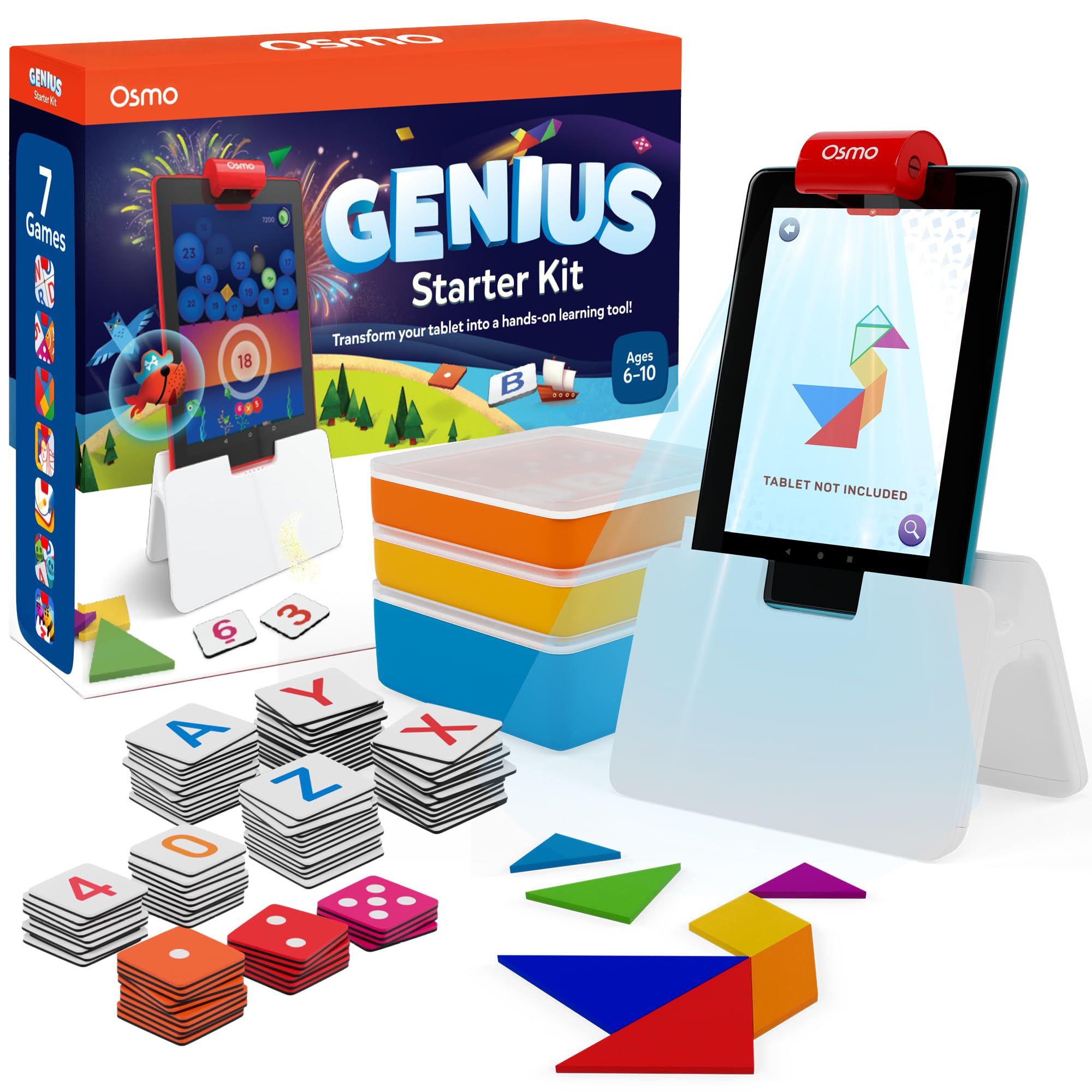
The Genius Kit is a broader STEM and learning bundle for someone who prefers activities such as math, spelling, drawing, and physics, and it requires a compatible Fire tablet instead.
- The Osmo Genius Kit includes seven learning apps spanning math, spelling, vocabulary, art, physics, and creative problem solving, along with a base and pieces for a Fire tablet.
- The Osmo Coding Kit concentrates on coding through three apps, 31 coding blocks, and puzzles that combine adventure, music, and command sequences.
Is Osmo Coding Kit Worth It?
The Osmo Coding Kit is worth considering for a child who enjoys hands-on puzzles and has access to a supported iPad.
Its 31 coding blocks and three apps cover adventure, music, and collaborative puzzle solving, giving coding practice several engaging forms.
Check iPad compatibility and iOS version before buying, since the tablet is required and sold separately.
If that setup suits your household and the child is interested in experimenting with commands, this is a well-rounded introduction to coding concepts.
Your review at a glance
2,000+ ratings
Read Amazon ReviewsOsmo Coding Kit
A hands-on introduction to coding for children who have a compatible iPad and enjoy learning through physical puzzles, music, and guided adventures.
- Three included apps: Coding Awbie, Coding Jam, and Coding Duo.
- 31 tangible coding blocks, including action commands, numbers, repeats, and subroutines.
- Osmo base and adjustable reflector for use with a compatible iPad; the iPad is not included.
- Coding Awbie uses physical blocks to guide a character through an adventure and introduce coding.